Enhancing File Management: The Power of Tagging for Seamless Organization
Unleash Order: Master Your Digital Files with Intelligent Tagging
The Hidden Potential of File Managers: Beyond Basic Search
Many users overlook the robust capabilities of their operating system's file manager, often resorting to manual browsing through countless folders when searching for documents. While standard search and filter functions are available, their full potential remains untapped by those accustomed to traditional, often chaotic, folder structures. This conventional approach frequently leads to wasted time and disorganized digital spaces, masking powerful features that could simplify daily tasks.
Revolutionizing File Retrieval: The Core Concept of Tagging
Imagine possessing a multitude of text files, each mentioning various software distributions like Ubuntu, Fedora, or ZorinOS. Without a systematic method, locating specific information within these files can be a daunting challenge. This is precisely where file tagging emerges as a game-changer. By assigning descriptive tags to individual files, users can categorize them in a flexible and dynamic manner. A single file can bear multiple tags, allowing for multifaceted classification. This method transforms file management from a rigid, hierarchical system into a fluid, interconnected network of information, making retrieval both intuitive and highly efficient.
Beyond Folders: Building Relational Connections with Tags
The essence of file tagging lies in its ability to establish relational links between disparate files. Instead of being confined to a single folder, a file can be associated with multiple categories, much like entries in a relational database. This flexibility enables users to define custom relationships, such as tagging recipe files by dish type, dietary preference, or cuisine, or categorizing audio files by genre, artist, or release year. Once implemented, this system fundamentally alters the user's interaction with their digital content, fostering a more intuitive and less time-consuming search process.
Navigating System Compatibility: Where Tagging Shines
While the utility of file tagging is undeniable, its widespread adoption is contingent on operating system and file manager support. Popular platforms such as macOS, iOS, iPadOS, and Windows seamlessly integrate tagging capabilities into their native file managers. On the other hand, certain environments, like Android's default file manager, currently lack this feature. Among Linux desktop environments, KDE Plasma stands out for its robust tagging support, offering users an efficient tool for digital organization, although its absence in some other Linux environments remains a noticeable gap.
Practical Application: Tagging with KDE Plasma's Dolphin
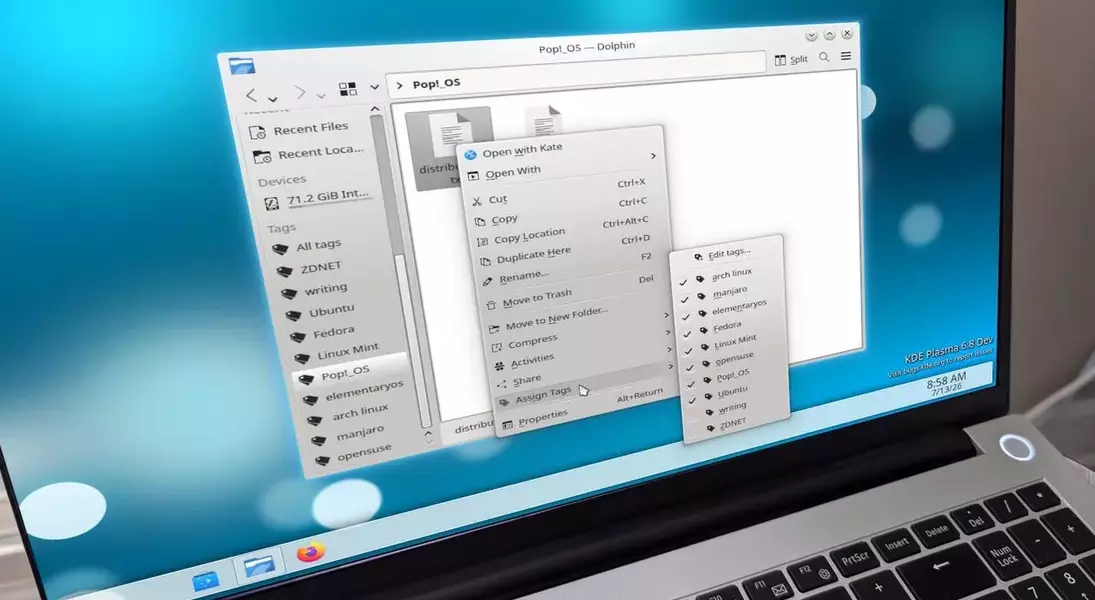
For users of KDE Plasma, harnessing the power of file tagging is straightforward within the Dolphin file manager. By right-clicking a file, one can easily assign existing tags or create new ones via the "Edit tags" option. To optimize efficiency, multiple tags can be entered simultaneously, separated by commas, which are then automatically associated with the selected file. Once tags are assigned, they become readily accessible in Dolphin's left sidebar, providing a quick pathway to all related documents. This streamlined process demonstrates how thoughtful design can significantly enhance the user's ability to manage and retrieve information.
The Unseen Advantage: Why Tagging Redefines Organization
For those struggling with disorganized digital libraries, file tagging presents an unparalleled solution. By enabling sophisticated relational searches and dynamic categorization, it offers a powerful alternative to the often-frustrating experience of navigating traditional folder structures. This method drastically reduces search times and enhances overall productivity, allowing users to efficiently locate and manage their files. While some may continue to adhere to conventional methods, the clear benefits of tagging underscore its potential to transform digital workflow and foster a more organized and accessible computing environment.